From U-Net to DiT: Z-Image Turbo Runs in Your Browser
Over the past few years, the Intel Web Platform Engineering team has pushed the boundary of what is possible in the browser for generative AI. We were among the first to run Stable Diffusion Turbo and SDXL Turbo fully in-browser using WebGPU and WebNN — no server, no cloud, just your device. Today we are sharing the next chapter: Z-Image-Turbo running natively in the browser via WebGPU on AI PC hardware, which is a generational leap in model quality, architecture, and capability.
This required solving a new class of problems. Earlier models were U-Net based; Z-Image Turbo is a Scalable Single-Stream Diffusion Transformer (S3-DiT) — a fundamentally different architecture that demanded a fresh approach to model conversion, quantization, and operator fusion for the web runtime.
Z-Image-Turbo at a Glance
Z-Image-Turbo is an open-weights text-to-image model built for high-quality, on-device generation on consumer AI hardware — proving that browser-native image generation can match modern prompt fidelity and visual quality without a cloud round-trip.
Where earlier pipelines relied on U-Net, a convolutional backbone tuned for local spatial features, Z-Image-Turbo adopts a Scalable Single-Stream Diffusion Transformer (S3-DiT) that processes text and image tokens in a single unified attention stream. The full pipeline chains three components: a Qwen3-4B text encoder for prompt understanding, the S3-DiT backbone for latent denoising, and a FLUX VAE decoder for pixel reconstruction. Because compute shifts from convolutions to Transformer operators — attention and large matrix multiplies — kernel- and graph-level optimization becomes the primary deployment lever.
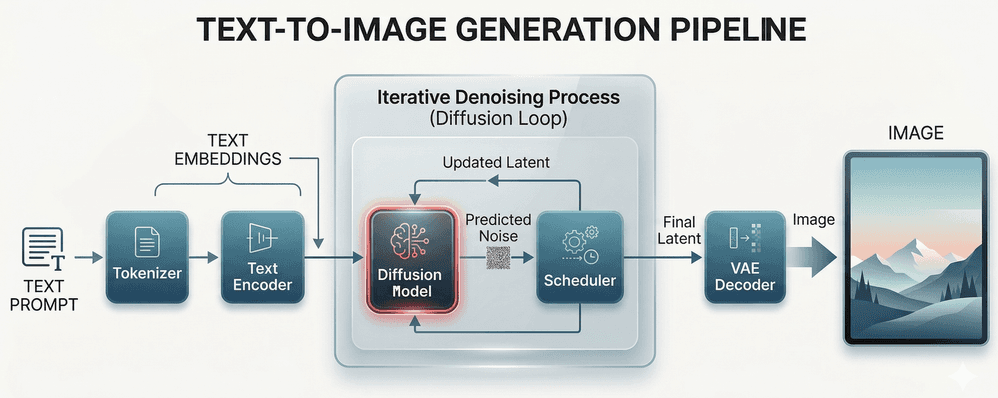
This design didn’t emerge in a vacuum. As the table below shows, the broader ecosystem has moved decisively toward DiT-family architectures. Z-Image-Turbo’s S3-DiT follows that trend — and at 6B parameters, it represents the current state of the art among open models optimized for on-device deployment.
| Model | Release | Size (Parameters) | Architecture |
|---|---|---|---|
| Stable Diffusion 1.5 | 2022 | ~860M | Latent Diffusion (U-Net) |
| Stable Diffusion XL (SDXL) | 2023 | 6.6B | Latent Diffusion (U-Net) |
| Stable Diffusion 3 (Medium/Large) | 2024 | 2B / 8B | Multimodal Diffusion Transformer (MMDiT) |
| FLUX.1 [dev] / [schnell] | 2024 | 12B | Hybrid DiT (Double-Stream + Single-Stream) |
| Qwen-Image | 2025 | 20B | Multimodal Diffusion Transformer (MMDiT) |
| Z-Image-Turbo | 2025 Nov | 6B | Single-Stream Diffusion Transformer (S3-DiT) |
The rest of this post explains what we did to make it viable in the browser.
Z‑Image Turbo in the Browser: Deployment and Optimization
Deploying Z‑Image Turbo in the browser requires adapting the native diffusion transformer to the Web under strict constraints on model format, memory footprint, and execution efficiency. In this section, we describe the key deployment and optimization steps that make this adaptation possible.
Model Conversion and Optimization
Adapting the native transformer-based model to the web requires a series of model preparation steps, including format conversion, memory reduction, and execution-oriented optimization.
Step 1: ONNX Conversion
We first convert the native transformer-based model into ONNX format, so it can be executed by ONNX Runtime Web using the WebGPU execution provider. Compared to U-Net architectures, transformer models require special handling to preserve the unified token sequence and attention structure during export.
Step 2: Size Reduction via Quantization
Running a modern diffusion transformer in the browser requires aggressive model compression to fit within the following key constraints of web runtimes:
- ONNX Runtime Web (Wasm): limits model size to 4 GB per session
- Chrome: limits the GPU process sandbox’s access to physical memory on Windows
To meet these constraints without sacrificing image quality, we apply a layered quantization strategy that combines aggressive weight compression with mixed‑precision execution.
INT4 Quantization
We quantize MatMul weights to INT4 and execute them using the MatMulNBits operator. For token embeddings (embed_tokens), we apply GatherBlockQuantized, which preserves lookup semantics while significantly reducing the weight footprint.
FP16 Quantization
The model is converted from float32 to float16 throughout. A small set of operations remains in float32 to prevent intermediate tensors from exceeding the float16 dynamic range, which is critical for maintaining numerical stability in the long attention sequences of S3‑DiT.
Step 3: Operator Fusion
To achieve practical throughput on WebGPU, we apply operator fusion to reduce GPU dispatch overhead and improve memory locality. By executing multiple transformer operations within a single dispatch, WebGPU enables efficient use of hardware-level operator support and delivers substantial end-to-end performance gains.
We fuse the following operator groups for the Z-Image Turbo web deployment:
| Fused Operator | Category | Performance Benefit |
|---|---|---|
| MatMulNBits | INT4 Linear | Reduces weight memory and bandwidth |
| GroupQueryAttention | Attention | Fused QKV dispatch |
| MultiHeadAttention | Attention | Cross-modal fusion efficiency |
| RotaryEmbedding | Position Encoding | Eliminates separate kernel overhead |
| LayerNorm / SimplifiedLayerNorm | Normalization | Reduces memory round-trips |
| GatherBlockQuantized | Embedding | INT4 lookup efficiency |
Summary
In summary, quantization significantly reduces model complexity by 54% and shrinks model size by 7x, while operator fusion delivers up to 7x inference speedup — making real‑time, in-browser transformer‑based image generation feasible on AI PC hardware.
End-to-End Inference Pipeline in the Browser
With the optimized model in place, the remaining challenge is executing the full diffusion workflow efficiently inside the browser. In‑browser inference requires carefully orchestrating multiple model components under tight constraints on memory movement and GPU dispatch overhead.
The following figure illustrates the end‑to‑end inference pipeline used to run Z‑Image Turbo entirely on‑device using WebGPU. The pipeline consists of four main stages: text encoding, iterative denoising, image decoding, and image rendering. The core diffusion process runs inside a tight denoising loop, where the transformer model and scheduler are executed repeatedly across diffusion timesteps.
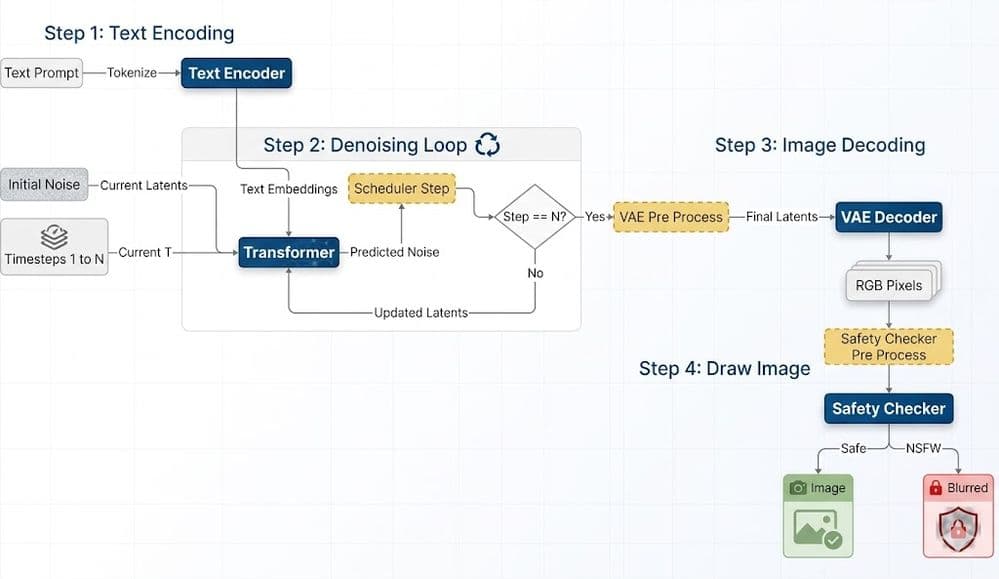
Several characteristics are critical for achieving practical performance in the browser:
- The denoising loop forms the performance‑critical path and benefits most from the model‑level optimizations described earlier.
- WebGPU enables the complete diffusion pipeline to run entirely on‑device as a single, end‑to‑end browser inference workflow.
- I/O binding is used across stages to reduce unnecessary memory copies between model executions.
Hardware Target: Intel Core Ultra Series 3 (Panther Lake)
Our optimized pipeline is validated on Intel Core Ultra Series 3 (Panther Lake) AI PC devices, where the WebGPU backend delivers its strongest results. The integrated GPU architecture and dedicated NPU in these chips align well with the fused-operator dispatch pattern of our pipeline — meaning users on current-generation AI PCs get a genuinely fast, responsive generation experience without leaving the browser.
This represents the convergence of two trends our team has tracked for years: increasingly capable client-side ML hardware, and an increasingly powerful web ML stack. Z-Image Turbo on WebGPU is a demonstration of what is now possible at their intersection.
Try It Live
The Z-Image Turbo web demo and full open-source implementation are publicly available:

The image above was generated directly in the browser using this demo. No setup required — open the demo in a WebGPU-capable browser on a compatible AI PC and start generating images entirely on-device.
Conclusion
With Z‑Image Turbo, we demonstrate that state‑of‑the‑art diffusion transformers can run entirely in the browser through fully on‑device inference, without relying on server‑side execution. Enabled by WebGPU‑optimized execution on AI PC, this work bridges the gap between SOTA generative models and practical, private, client‑side web deployment.